Compass
Compass shows the heading every orienting view in the firmware is using, and runs the magnetometer
calibration sweep that makes that heading worth reading. It needs the optional ICM-20948 on the SAO
header J8, which is not fitted from the factory. See
Compass and IMU for the wiring, then turn on
IMU compass enabled (imu_enabled) in the Compass group in Settings and restart the badge.
imu_enabled, imu_sda_pin, imu_scl_pin and imu_addr_hi are read once at boot, so a change to
any of them needs a restart. mag_decl_ddeg and mag_cal_use are re-read about once a second, so
those two take effect while the badge runs.
The sensor half of this is confirmed on hardware: an ICM-20948 on the SAO bus is detected and
identified, WHO_AM_I reads 0xEA, and the AK09916 magnetometer answers and enters continuous mode.
The heading half is not. No reading has been compared against a known bearing, and the axis transform
between the two dies and the calibration sweep are untested in the field, so read the heading here
against a bearing you trust before you rely on it.
What it shows
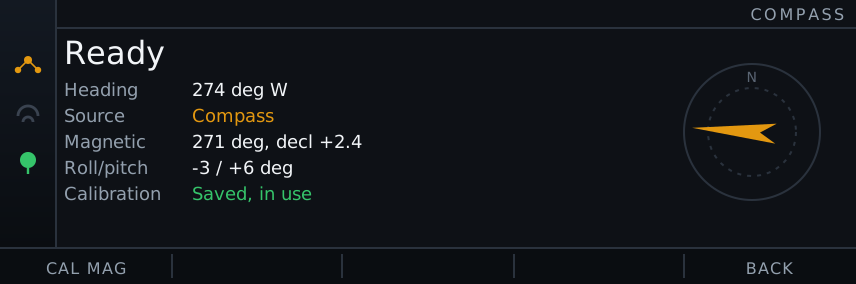
Section titled “What it shows”The large line at the top is the state:
| State | Meaning |
|---|---|
Off in Settings | imu_enabled is off, so the sampling task was never started. Turn it on and restart |
No IMU on SAO | imu_enabled is on but nothing answered on the SAO bus at boot. Check SDA, SCL and the power at J8 |
No magnetometer | The ICM-20948 answered but the AK09916 inside it did not. The accelerometer works, so roll and pitch read out, but no heading can be produced |
No data | The part is there but no heading has arrived for more than 2 seconds |
Uncalibrated | Samples are arriving but no calibration is being applied, so no heading is published. Either nothing has been swept yet, or a calibration is saved and switched off with mag_cal_use |
Ready | The heading is fresh and calibrated |
Calibrating N pts | A sweep is running, with the samples collected so far. F1 saves is added once the sweep is usable |
Below it, five rows:
| Row | What it reads |
|---|---|
| Heading | The heading a heading-up view would use right now, in degrees true and as a compass point, or -- when there is nothing usable |
| Source | Compass, GPS course, or None. This is the same arbitration every heading-up view runs, so it is the honest answer to “is it actually using the IMU?” |
| Magnetic | The heading before declination is added, and the declination in use, for example 274 deg, decl +2.4 |
| Roll/pitch | The tilt in degrees, from the accelerometer alone. Positive pitch is nose up, the badge’s top edge lifted; positive roll is left side up |
| Calibration | Saved, in use, Saved, mag_cal_use off, None, press F1, Sweeping, keep turning, or Ready to save, and -- while the state line reads Off in Settings or No IMU on SAO |
Roll and pitch are how you tell the two dies inside the part apart. That row has its own freshness, 2 seconds like the heading, and does not depend on the state above: it keeps reading while the magnetometer is uncalibrated, and while the magnetometer is silent and no heading exists at all. Tilt moving with no heading means the accelerometer is fine and the magnetometer is the problem.
The heading is smoothed before it is published, with a 200 ms time constant, so it lags a fast turn slightly. That is deliberate: the map views redraw the whole basemap from storage whenever the up direction moves by more than 3 degrees, so an unsmoothed heading would repaint them continuously.
The gyroscope and the die temperature are read from the sensor but do not feed the heading. The heading is the accelerometer and the magnetometer only, which is what makes it valid standing still.
The compass itself needs no GPS fix. The only thing GPS is used for on this page is the fallback: with no compass heading, the Source row falls back to GPS course over ground.
| Key | Action |
|---|---|
| F1 | Cal mag: start a calibration sweep. During a sweep, Save |
| F2 | Cancel, during a sweep only |
| F5 / Esc | Back to the launcher |
F1 is unlabelled and does nothing when there is no magnetometer answering, because there would be nothing to calibrate.
With a BNO055 there is no sweep
Section titled “With a BNO055 there is no sweep”If mag_source is bno055 this page has no F1 action, and that is correct rather than broken. The
part fuses its own heading and calibrates itself as the badge moves, so the badge never applies a
correction to it and a sweep it controls would promise something it cannot deliver. The Calibration row
reads self, mag n/3 and a heading appears once that reaches 2. Turn the badge through a figure of
eight to get there, and read the four figures in Diagnostics to watch it happen.
Judging the sensor itself
Section titled “Judging the sensor itself”Calibration cannot fix a magnetometer that is not measuring, and the two faults look identical from this page: both give a heading that will not settle. F3 in the Diagnostics app tells them apart. It runs the AK09916 self-test, which energises a coil on the sensor’s own die, so the datasheet fixes the counts a healthy part returns. The measurement is the coil field plus the ambient one, so a strong field nearby fails it too, but the size and shape of the failure tells the two apart.
Run it before sweeping again if the heading is unstable. See Troubleshooting for how to read the result.
The magnetometer must be calibrated before any heading is published
Section titled “The magnetometer must be calibrated before any heading is published”An uncorrected magnetometer can read tens of degrees out, from the badge’s own metal and from whatever it is mounted next to, and only you turning the badge can measure that. Until a calibration is applied the compass publishes no heading at all.
Press F1 (Cal mag) and turn the badge slowly through every orientation, in a figure of eight, away from magnets, metal and speakers. The sweep has three conditions, all of which must be met:
- At least 200 samples, which at the 20 Hz sample rate is about 10 seconds of turning
- A span of at least 20 uT on each of the three axes. Turning the badge flat on a table sweeps two axes and fails on the third
- Directional coverage: all eight octants. Each sample is filed by the sign of its three axes about the box centre so far, and the sweep refuses to finish until it has seen samples in all eight of those octants
The third condition is why rocking the badge back and forth is refused even though it moves all three axes. A rock through a small angle pushes every span past the 20 uT floor while leaving whole directions unseen, and the centre of a half-swept box is not the hard-iron offset. Turn the badge right over instead: nose up and nose down, on its left side and on its right side, face up and face down.
A sweep that passes all three conditions can still be wrong
Section titled “A sweep that passes all three conditions can still be wrong”The three conditions are necessary but not sufficient, so the tilting is not optional advice. A sweep that spins the badge through a full turn while holding it roughly level can satisfy all three and still be wrong: the vertical part of the earth’s field is never measured from both sides, which at Swiss latitudes leaves the vertical axis offset out by tens of uT. That error cancels while the badge is level and grows as you tilt it, so the symptom is a heading that looks right in the hand and wanders as the badge tips. If you see that, sweep again with steeper tilts.
Samples with a field shorter than 0.1 uT are ignored rather than folded in, because a dropped magnetometer read arrives as zeroes and one of those would drag the box centre off by half the field. So a sample count that does not climb while you turn means the magnetometer is not answering, not that you are turning too slowly.
Saving, cancelling and leaving mid-sweep
Section titled “Saving, cancelling and leaving mid-sweep”The Calibration row says Ready to save once the sweep is usable. Press F1 (Save) then. Saving
earlier is refused and the hint says so, so keep turning and press F1 again. F2 (Cancel) abandons the
sweep and keeps whatever calibration was already in use.
Leaving the app mid-sweep does not cancel it. The sweep lives in the compass service, so coming back still offers Save. A sweep nobody comes back to is abandoned after 120 seconds, because past that the box is only widening with unrelated field data.
A saved calibration is a hard-iron offset and a per-axis soft-iron scale. It is written to NVS, so it survives reboots, and it is applied to the next sample, so the heading is corrected without a restart. Redo it if you move the sensor, change the case, or put anything magnetic near the badge.
Turning the saved calibration off stops the heading entirely
Section titled “Turning the saved calibration off stops the heading entirely”Use saved calibration (mag_cal_use) is on by default. Turning it off does not give you a raw
heading: it makes the compass publish no heading at all, and the heading-up views drop back to GPS
course over ground. It is there to take the calibration out of the picture when you suspect it.
Nothing hides that state. The Calibration row reads Saved, mag_cal_use off, the hint on this page
points at the setting instead of inviting another sweep, saving a fresh sweep while the setting is
off says so rather than promising a corrected heading, and the views that name their up direction say
cal off rather than cal. Another sweep cannot fix a calibration the setting is ignoring.
Declination is yours to enter
Section titled “Declination is yours to enter”Bearings everywhere in the firmware are degrees true, not magnetic. The magnetometer measures
magnetic north, so the difference between the two, the declination, is added to every heading. The
badge carries no magnetic model and cannot work the value out from your position, so it is a user
setting: Declination (0.1 deg, E+) (mag_decl_ddeg) in the Compass group.
Look up the declination where you are, east positive, and enter it in tenths of a degree. 2.4 degrees
east is 24, 8.0 degrees west is -80, and the range is -1800 to 1800 (-180.0 to +180.0 degrees).
It is re-read about once a second, so the change is visible without a reboot.
Get it wrong and every heading in the firmware is out by the same fixed number of degrees, in the same direction, while distances and bearings between two known positions stay correct. That is the signature to look for. The Heading and Magnetic rows here, and the single Heading row in Diagnostics, show the true heading, the magnetic heading and the declination together so you can check it against a bearing you know.
Where the heading is used
Section titled “Where the heading is used”Once the state says Ready the heading is available to every view that orients itself, but not every
view asks for it:
- Tracker, Follow and the needles in the Nodes list use it as soon as it is usable. They have no orientation toggle, so their needles turn while you stand still, which GPS course over ground can never do
- Radar and Map default to north-up and only consult the compass after F1 selects heading-up. In north-up they ignore it however good the heading is, so a Radar scope that will not turn is usually F1, not the compass
- The map view in Breadcrumbs never uses it. It is always north-up and has no toggle
GPS course over ground is the fallback in all of them: it is used when there is no compass heading and you are moving faster than 1 knot. With neither, the view is north-up.
Why a view is showing north
Section titled “Why a view is showing north”There are four reasons a view that wanted a heading is showing north, and they need four different things from you, so each one is named rather than lumped into one message:
| Reason | What has happened | What to do |
|---|---|---|
move | No compass to wait for: imu_enabled is off, nothing answered on the SAO bus at boot, or the magnetometer die is silent | Move faster than 1 knot and GPS course takes over, or fit and enable a sensor |
cal | The compass is sampling but no calibration has been swept | Run the sweep in this app |
cal off | A calibration is saved, but mag_cal_use is off so it is not applied | Turn Use saved calibration back on in Settings |
wait | The compass is fitted and calibrated and the samples are only late: nothing fresh for more than 2 seconds, or the view has not seen its first heading yet | Wait a moment. If it stays, check the wiring: the Compass Data row in Diagnostics shows whether reads are failing |
Radar and Map put the word in brackets after North up, for example North up (cal off). Tracker
and Follow name the same reason in their readout. The Nodes needles just point north and say nothing,
so this page is where you find out why.