
Architecture overview
The design rule is one owner for the e-paper. A single always-on daemon (iosbackupmachine.service) holds the display for the whole uptime and draws every screen. Nothing else ever opens the panel. This is what removed the SPI-bus conflicts and the “screen not updating” failures that came from several processes fighting over the same hardware.
Everything else in the system only writes state. The backup logic, remote sync, web UI, and PiSugar button each update a file or drop a small sentinel, and the daemon reads that state and decides what to draw.
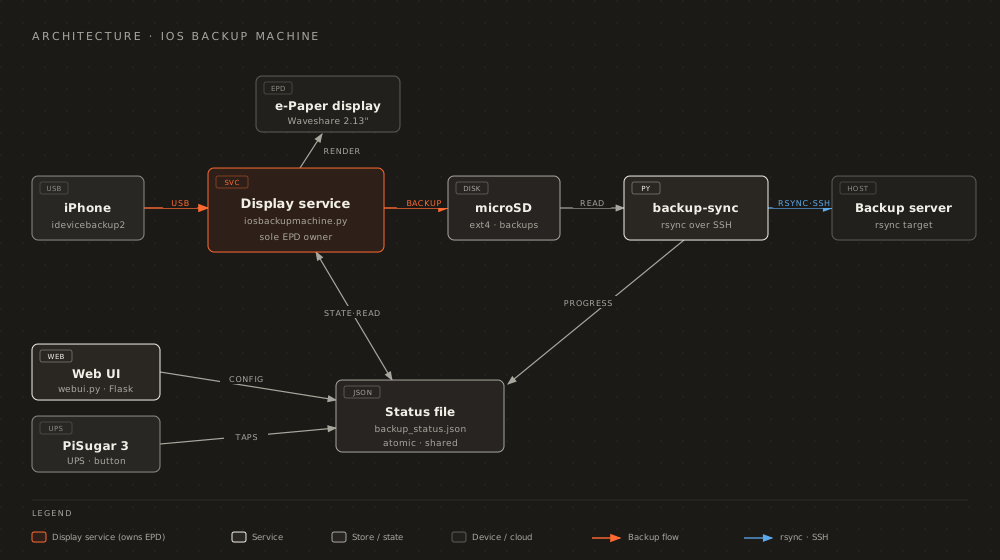
The single display owner
Section titled “The single display owner”The daemon renders all of these from state:
- Boot and idle screen
- Backup progress
- Remote sync progress
- Single-tap system info
- Unplug and interrupted screens
- The power-off owner screen
The rest of the system stays off the panel:
- Backup runs inside the daemon, which detects an iPhone by polling rather than restarting on a udev event. An earlier design restarted the service on plug, which tore down the display owner mid-render.
- Remote sync (
backup-sync.py) writes progress to the status file, and the daemon draws it. - The single-tap info screen is handled by the daemon’s button listener.
- Unplug is a udev event that only stops a running
idevicebackup2; the daemon then draws the interrupted screen. - Shutdown sends the daemon
SIGTERM, and it paints the owner screen and sleeps the panel so the image survives after power-off. - The web UI Start and Stop actions drop sentinel files that the daemon consumes, instead of restarting the service.
State drives the screen
Section titled “State drives the screen”A shared status file is the contract between the writers and the display. The daemon reads it on every tick and paints one full refresh on each screen-type transition, with partial refreshes for animated progress. Because only the daemon touches the panel, there is no lock to contend for and no way for two screens to overlap.
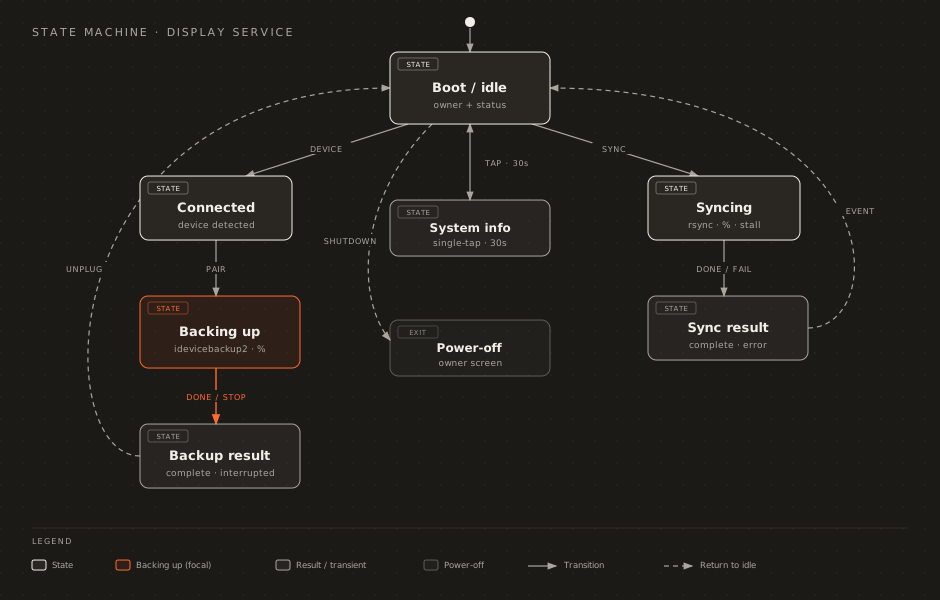
Failure handling
Section titled “Failure handling”Because the daemon is the only process that can draw, losing it costs the display for the rest of the uptime. Swallowing every error is the wrong fix, though: a daemon that is alive and doing nothing is the worse failure, since nothing reports it. A fault therefore either degrades to something honest, or exits non-zero so systemd restarts the process.
- Startup faults degrade. An unwritable log directory, a config that crashes the loader, or a panel that will not initialise each cost one capability and leave the rest working, instead of taking the process down.
- Fatal faults exit non-zero, so
Restart=on-failureoniosbackupmachine.servicebrings a working daemon back rather than leaving a dead one. - A wedged main loop is caught by a heartbeat watchdog. The loop, and every long hold it can legitimately sit in, beats a timer; if no beat lands inside the window the process logs
[FATAL] main loop stalledand exits 1. - Headless is recoverable, not permanent. A daemon running on the no-op panel keeps retrying the real one in the background, so a panel that was busy at boot comes back without a restart. See Display and controls.
- A backup is guarded during the run, not only before it. One health probe re-checks the drive, the free space, and the battery every 10 seconds, and a silence timeout and a total cap bound a run that is producing nothing. See Backups.
- A
config.yamlthat cannot be read falls back to the built-in defaults instead of failing to start, keeps the bad file for inspection, and says so in the web UI. See Security.
Every guard fails open in the direction that keeps the appliance usable: a probe that cannot answer lets the work through, because a guard misfiring on its own broken probe is worse than the failure it was added to prevent. The quiet-device alert is the one inversion, and for the mirror-image reason. It fails silent, because one false alarm there costs the credibility of every later true one.
Where to go next
Section titled “Where to go next”- Device connectivity: how the daemon keeps an iPhone visible and the VPN handshaking
- Security: credential encryption, web UI auth, and what the appliance trusts
- Display and controls: the screens and the button actions from a user’s point of view